Blaze TrayAudio - Only 99¢!
Buy Blaze TrayAudio for only 99¢

The most convenient media player ever!
Free 15-Day Trial! Click Here to Download It Now!
Blaze TrayAudio is a small yet very powerful media player for enjoying all of your favorite music and audio files. Blaze TrayAudio has many advanced features for listening to music while you work or play, while at the same time staying extremely efficient so as not to slow down your system!
Blaze TrayAudio can handle the most popular sound formats, including: MPEG Audio Layer-3 (MP3), MPEG Audio Layer-2 (MP2), Microsoft Windows Media Audio (wma), CD Audio Track (cda), Active Streaming Format (asf), Waveform Audio (wav), Audio Interchange Format (aif, aiff), SUN Microsystems Audio (au), Musical Instrument Digital Interface (mid, midi, rmi), Macintosh Sound Resource (snd), Raw Unsigned PCM Data (various extensions), audio playlists, and more, including other variations and less common formats.
Blaze TrayAudio can play one or more selected songs, or an entire playlist. You can easily create and save playlists of your favorite songs for convenient access later. You can even save playlists as HTML files. Blaze TrayAudio supports playlist loop and randomize features, and can scan playlists to remove duplicate files or those that no longer exist.
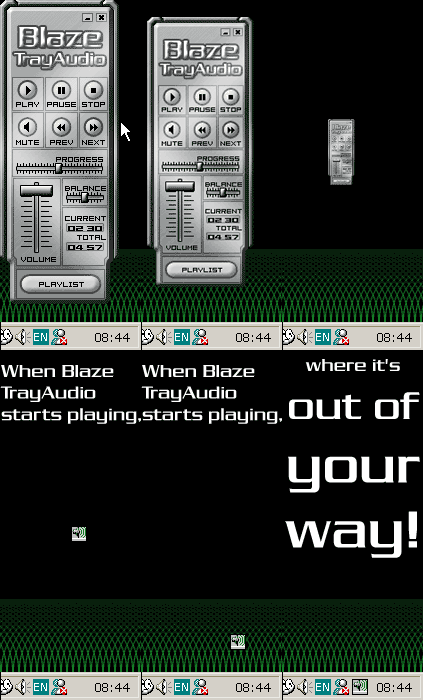
The Blaze TrayAudio
interface is easy-to-use, giving you buttons for the most commonly used
features, controls, and indicators. Like any good music player, Blaze TrayAudio
lets you play, seek, pause, stop, and skip to the next or the previous song. It
also has a handy volume control slider, mute button, balance control, and
progress tracker. When a song is playing, its duration and elapsed time are
displayed. You can have Blaze TrayAudio display in a compact mode by hiding the
currently loaded playlist. The interface is skinnable, so you can get a look
that suits your personal taste. When Blaze TrayAudio starts playing, it will
automatically minimize to the system tray where it's out of your way. In this
way you can go on with your work or play while enjoying the desired audio
playback. You can easily access the most commonly used features by simply
right-clicking on the Blaze TrayAudio icon in the system tray and selecting the
desired
command.
With its advanced features, easy-to-use interface, and customizable options, Blaze TrayAudio is just what you've been searching for -- and more!
Download it now!
Blaze TrayAudio - 15 day demo:
bta_setup.exe (3.21 mb)
Buy
it Now!
Buy Blaze TrayAudio right now via our secure, online order form.
30-day, 100% money back guarantee if you're not completely satisfied.