Home · Products/Services · Purchase · Help Center · Press Center · Contact Us! · Call Toll-Free 800-516-9167

All Products/Services
Images: In Context!
AnyWhere 6 Pro
Always Watching
Blaze TrayAudio
A Game of Memory
Amazing Mail Checker
Starbrite
 

All Products/Services
Learn Hypnosis... Now!
Hypnotic TranceScapes
Million Dollar Emails
Fearson's Aces Magic
FoldItself Bill Magic
 

All Products/Services
TransformDestiny.com
LearnHypnosisNow.com
TranceScapes.com
SWMirror File Hosting
Shareware Junction
Files32
Digital Shockwave
SoftReviewer.com
ImagesInContext.com

Weight loss and quit smoking hypnosis CDs at TranceOut.com

Toll free number with voicemail, call forwarding & email notification - $9.99 /mo

Men - Click here to take control of your dating life! Dating-tips-for-guys.com - Free resources for men.


Liquid Mirror Enteprises strives to bring you the best in Windows software, websites and great book and music publications.
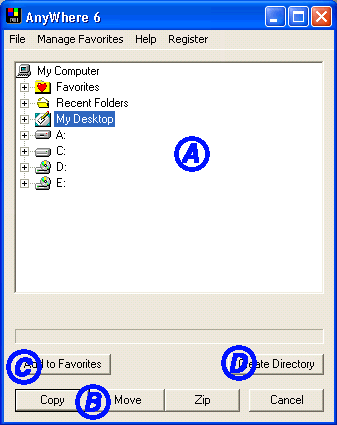
How Do I use AnyWhere 6?
  1. Highlight the file(s)/folder(s) that you want to copy or move.
  2. Right click on any one of them and select 'AnyWhere 6'.
  3. Choose your destination using either the 'Favorites' folder or 'Recent Folders', Directory tree (A) . If you'd like to create a new directory, use the 'File' menu or click the 'Create Directory' button (D).
  4. If you'd like to save the selected folder as a Favorite, choose the 'Add to Favorites' button (C) now.
  5. Choose either the Copy, Move or Zip button (B) or choose Copy, Move or Zip from the 'File' Menu

Back to Main